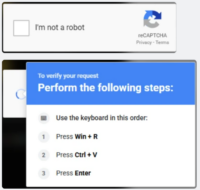
The Office of Information Systems wants everyone on campus to be aware of a deceptive pop-up technique being used to trick people into running malicious commands on their own computers.
What it looks like: You’re on a website, and a box appears asking you to click to prove you’re not a robot, styled like an ordinary CAPTCHA. After you click it, a second box appears with “verification steps” telling you to press Windows key + R, then Ctrl+V, then Enter.
This is not a real verification check. Clicking the first box secretly copies a hidden command to your clipboard. The three “steps” are walking you through pasting and running that command — which can silently download and install malicious software, with no download or file you’d ever see.
If you see this: Close the tab. Do not press Windows key + R, do not paste anything, and do not press Enter. A real CAPTCHA never asks you to do this.
If you already did this, contact Campus Support at campussupport@atu.edu or call us at 479-968-0646 right away. You won’t be in trouble for reporting it, and the sooner we know, the easier it is to handle.
Please contact Campus Support if you see anything out of the ordinary. Reporting something that turns out to be nothing is always fine.